

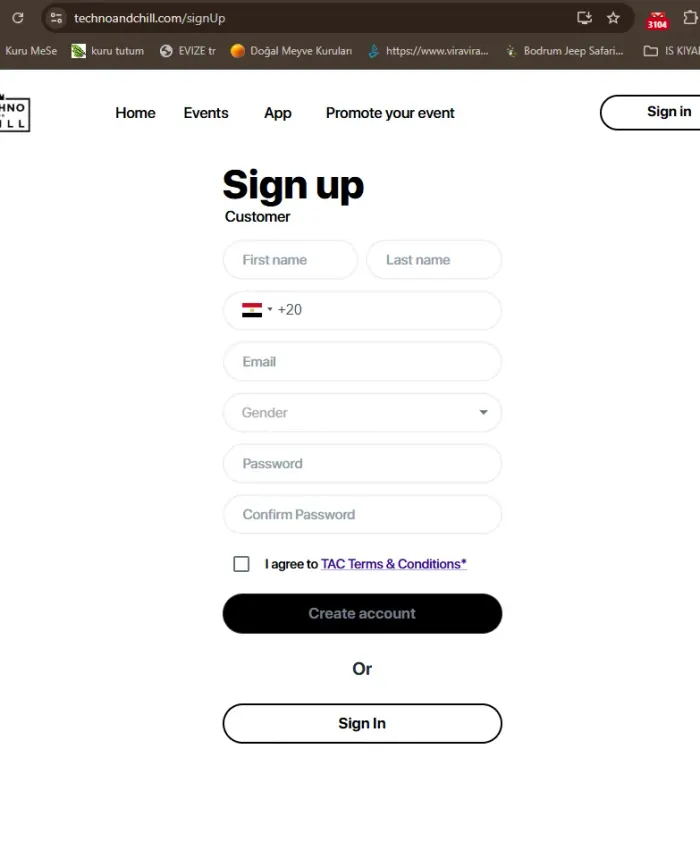
Step 1
Click the link below to register on the festival organizer's system!
https://www.technoandchill.com/signUp
/You must fill in the email and phone number you actually use correctly./
Step 2
After confirming your email, click the link below to log in to the festival organizer's system!
https://www.technoandchill.com/sign-in
Step 3
After logging in, select the EVENTS section of the website, click EGYPT and select the ZAMNA EGYPT event
https://www.technoandchill.com/events
Step 4
Click the REQUEST TICKET button located at the bottom of the selected event's page.
Step 5
On the ticket selection page, click the + button on WAVE 4 - GA weekend package to set how many tickets you want, then click the CONTINUE button at the bottom of the screen
Step 6
Enter the ticket holder's email, phone, gender and a link to their real, non-fake social media profile.
/Please note that if you enter false information, you may not be granted the right to buy a ticket!/
Tick the I agree confirmation and click the Send Request button.
/if you filled in and submitted your information correctly, a response to your request will be sent within 24 - 48 hours to your confirmed email or to WhatsApp on your phone number/
Step 7
If your request has been approved, log in to the system following Step 2. Select your ticket from the Purchased tickets menu.
https://www.technoandchill.com/purchased-tickets
Step 8
If your request has been approved, log in to the system following Step 2. Select your ticket from the Purchased tickets menu and click the Approved Pay Now button.
https://www.technoandchill.com/purchased-tickets
Step 9
Click the Buy Tickets button in the window that appears.
Step 10
Enter your internationally enabled bank card details and click the PAY button.